RDP File Signing Requirement — April 2026
Starting April 14, 2026, Microsoft Windows updates change how unsigned RDP files are handled — every unsigned file now triggers a security warning on each launch.
What Changed?
Microsoft's April 2026 Patch Tuesday update (KB5082200 and related updates for Windows 10 and 11) introduced a new mandatory warning for Remote Desktop Protocol (.rdp) files. Unsigned or incorrectly signed RDP files now display a "Caution: Unknown remote connection" dialog with "Unknown publisher" on every single launch — even if the file was previously opened without issue. This warning cannot be suppressed or remembered for unsigned files.
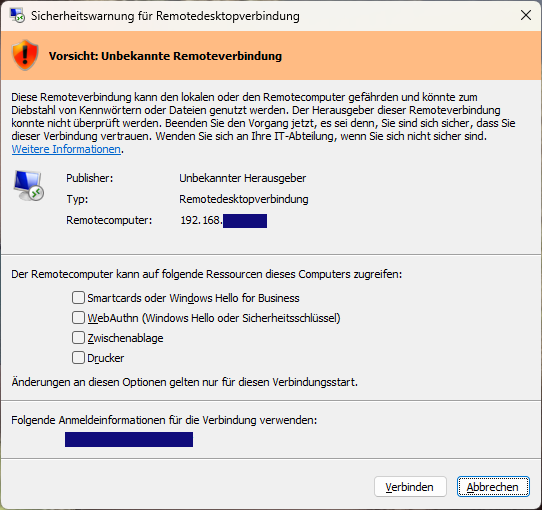
Why Was This Introduced?
This change is a direct security response to targeted phishing campaigns carried out by Midnight Blizzard (APT29), a Russian state-sponsored threat group attributed to the SVR intelligence service. Attackers distributed malicious .rdp files disguised as legitimate remote access configurations to gain footholds in corporate networks. By enforcing publisher verification on every RDP file launch, Windows makes it significantly harder to trick users into connecting to untrusted or attacker-controlled remote systems.
How Does Signing Help?
When an RDP file is digitally signed with a trusted X.509 certificate, Windows displays the certificate's Common Name as the publisher identity. Users can then choose to permanently trust that publisher — so the confirmation prompt only appears once, not on every launch. Without a valid signature, the full "Unknown publisher" warning appears every time the file is opened, disrupting workflows and creating alert fatigue that causes users to click through warnings without reading them.
Sign Your RDP Files Today
RDP Sign lets you upload .rdp files, associate them with a signing certificate, and download a properly signed version ready for distribution. You can generate a self-signed certificate directly in the app or upload your own existing key pair.
Bronze, Silver, and Gold subscribers sign files instantly without waiting for admin approval. Free accounts are supported too — your signed files are delivered after a brief manual review.